Six workbenches cover the broker's side of commercial insurance. InsightPlacement works a renewal from the 120-day mark to the bind order. InsightProofing checks the issued policy against what was quoted, bound and expiring. InsightAdvocate argues the client's side of a claim from the policy wording. For deal work, InsightDueDiligence reviews a target's insurance program and InsightDealDesk places R&W, tax and contingent liability cover. For brokers that buy agencies, InsightRollup turns a seller's book export into retention, concentration and an IC memo. All six run on one platform. Engines compute every figure and agents reason over those figures with the model, citing each one. Every agent action is capped at ask first, so a person accepts, changes or rejects it on a signed decision record. InsightPulse supplies the company view and InsightXtract reads the documents. The same platform sits under the carrier-side workbenches, InsightUW and InsightCW.
The problem: the broker's day is spent reading
Follow one middle-market client through a commercial broker's year and count the documents. At 120 days before renewal the account team orders loss runs and chases an updated statement of values. Then it builds a submission by hand from five sources and sends it to markets chosen partly from memory. Quote letters come back as PDFs, each one typed into a comparison spreadsheet. The binder gets a quick look, and the policy arrives weeks later. If anyone reads it line by line against the binder, they find out whether the $5,000 deductible became $10,000 or an endorsement the client paid for went missing.
Six months later the client has a loss and the carrier sends a reservation-of-rights letter. Someone has to map each position in it to the clause it cites. Someone has to notice that the general liability policy has a shorter notice condition than property, and that the carrier has missed three of its own deadlines.
Specialist practices have it worse. A transaction liability team reads a whole data room to predict which exclusions an R&W underwriter will write. An insurance due-diligence team copies limits from forty documents into a spreadsheet in three weeks. A broker buying agencies rebuilds retention and producer concentration by hand from every seller's book export.
In each case the reading takes most of the time and the judgement takes very little. The misses are quiet, and each one can become an errors-and-omissions matter. Generic AI tools help with the reading but make the E&O problem worse. A chatbot that summarises a binder cannot say which page each figure came from, and it cannot show who agreed to what.
What we built instead. One workbench per broker job, each with agents that do the reading and engines that do the arithmetic. A person with the authority makes every call that commits the client or the brokerage, and all six share one platform and one way of recording decisions. In short: the engines compute, the agents prepare, a broker decides, and the record keeps it.
The suite at a glance
Each workbench has its own site, demo book and worked use cases. All screenshots in this post come from those demo books, which use invented brokers, clients, carriers and figures.
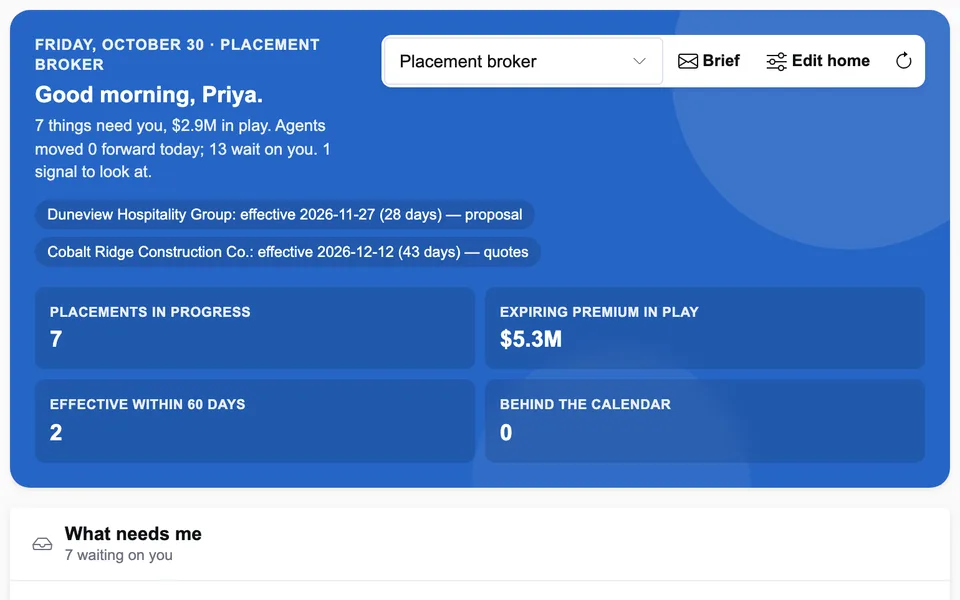
InsightPlacement
From the 120-day mark to the bind order: readiness, SOV gaps, the submission, market selection, quote comparison, surplus lines and the proposal.
insightplacement.com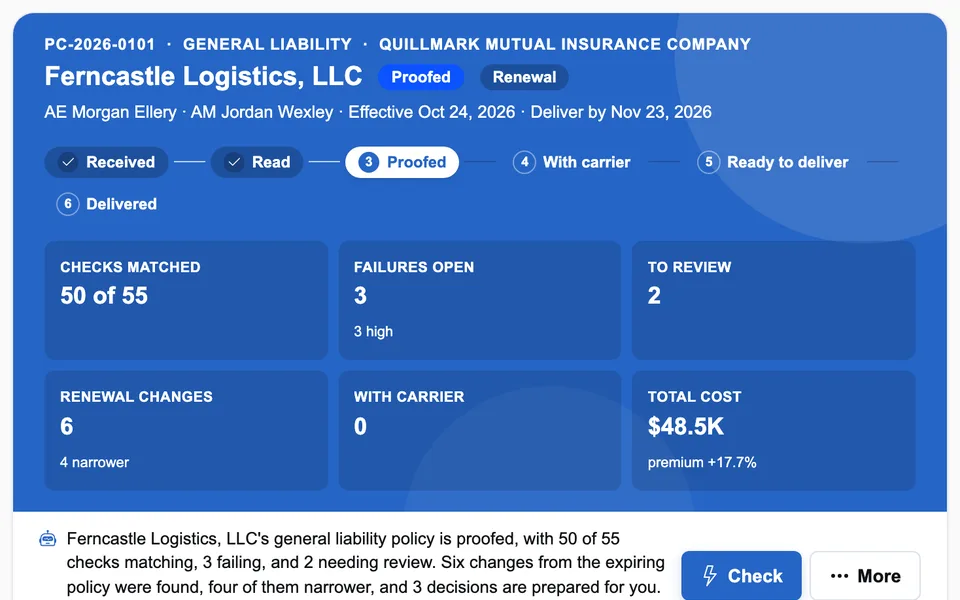
InsightProofing
Binder, quote and expiring against the issued policy, field by field. The engine decides pass or fail. Corrections go to the carrier as tracked requests.
insightproofing.com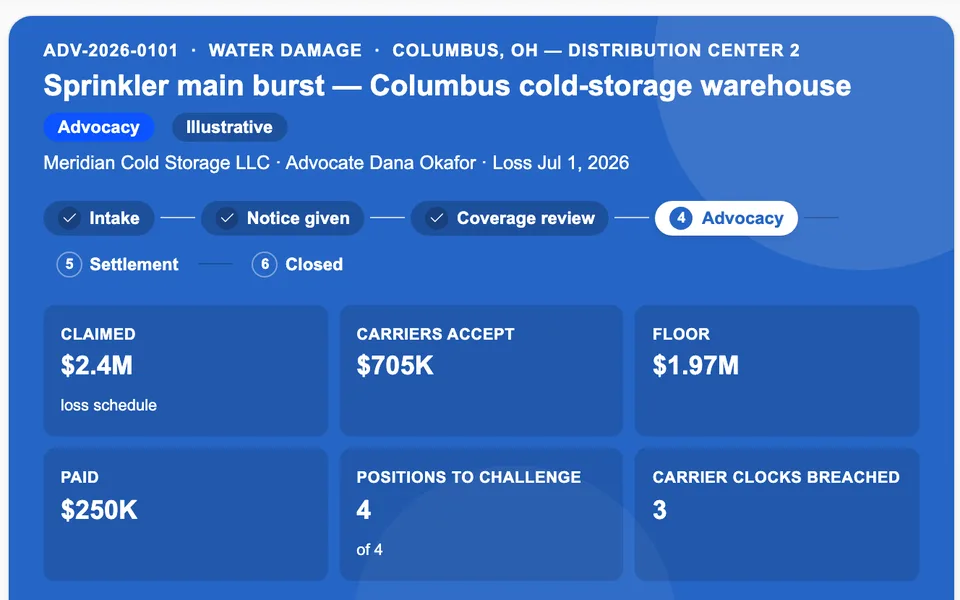
InsightAdvocate
Notice deadlines, every carrier position against the wording, the carrier's own deadlines, rebuttals and a settlement floor built from the record.
insightadvocate.com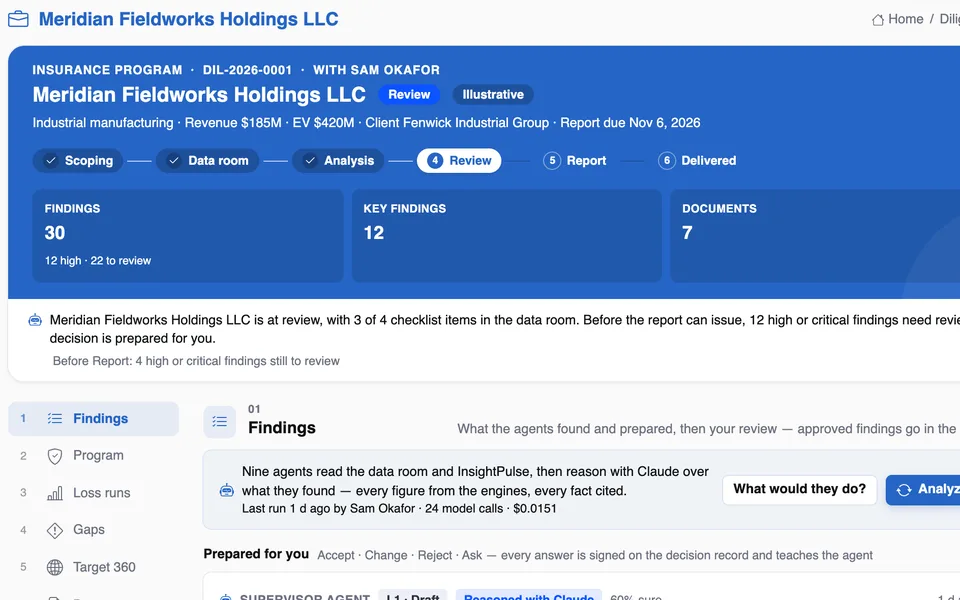
InsightDueDiligence
A deal target's program, losses, gaps, tails and contingent liabilities from the data room, with each finding cited and reviewed. Vendor reviews too.
insightduediligence.com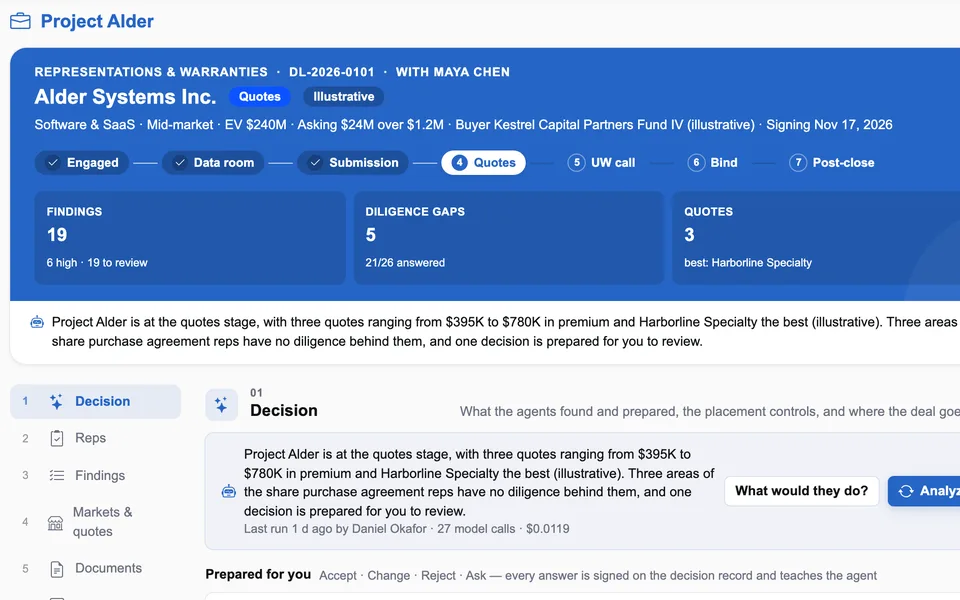
InsightDealDesk
R&W, tax and contingent liability for M&A: the data room read, exclusions predicted, quotes compared and the binder checked.
insightdealdesk.com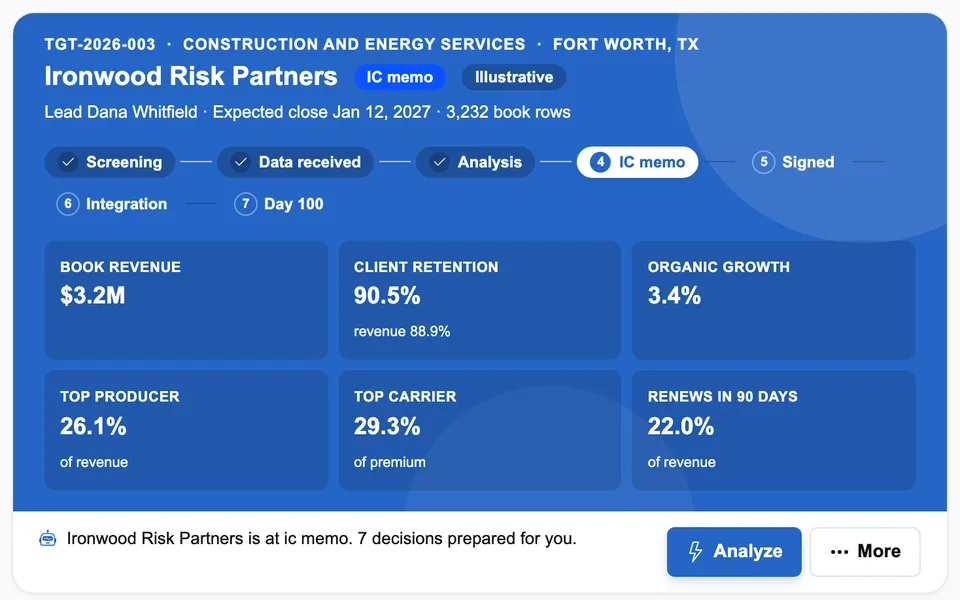
InsightRollup
A seller's book export, row by row, into retention, concentration, producers, appointments, an IC memo and a 100-day plan.
insightrollup.com| Workbench | The job | What a person still decides |
|---|---|---|
| InsightPlacement | Renewal readiness on a 120/90/60/30-day calendar, loss-run orders, SOV and exposure gaps, a market-ready submission, market ranking, quote comparison against the expiring, the surplus lines affidavit, the proposal and the bind order | What goes to the client and to markets, which quote is selected on each line, the bind order |
| InsightProofing | Expiring, quote, binder, policy and endorsements read into one set of standard fields. Proofing, renewal comparison, tower checks, carrier corrections and the client summary | Raising a correction, waiving a difference with a reason, signing and delivering to the client |
| InsightAdvocate | Notice deadlines per policy, carrier positions mapped to clauses, other insurance, carrier service clocks, proof of loss, the settlement floor and client updates | Every notice, rebuttal, escalation and recommendation that goes to a carrier or a client |
| InsightDueDiligence | A target's program, loss runs, coverage gaps, tails and change-of-control clauses, subsidiaries, contingent liabilities and the cost of the program after closing | Approving, changing or rejecting each finding. Only reviewed findings reach the report, and sharing with the deal is a broker's action |
| InsightDealDesk | Data room reading, reps and diligence gaps, predicted exclusions, the submission, market fit, quote comparison, underwriting-call prep and the binder and policy check | Sending the submission, approaching markets, selecting a quote, accepting a binder, signing off |
| InsightRollup | Book import, retention, growth, concentration, revenue quality, client overlap, carrier appointments, the IC memo and the day-100 plan | Seller requests, retention agreements, appointment requests, the memo's assumptions |
How they connect
The six workbenches cover three kinds of broker work. Deal work runs from diligence into the transaction placement. Agency acquisitions bring a new book into the brokerage. The client's policy year runs from placement to proofing to claims, then back into the next renewal. Two products feed all three, and the carrier-side workbenches sit across the trade.
flowchart TB
    PX["InsightPulse: company 360, news
InsightXtract: documents into fields"]
    subgraph DEAL["Deal work"]
        DD["InsightDueDiligence
the target's insurance"] -- "reviewed findings,
signed" --> DK["InsightDealDesk
R&W, tax, contingent"]
    end
    RU["InsightRollup
buying agencies"]
    subgraph LIFE["The client's policy year"]
        PL["InsightPlacement
120 days to bind order"] -- "bound program" --> PR["InsightProofing
issued vs bound"]
        PR -- "policy as issued" --> AD["InsightAdvocate
claims advocacy"]
        AD -- "loss brief for
the renewal" --> PL
    end
    subgraph CAR["Carrier side"]
        UW["InsightUW
underwriting"]
        CW["InsightCW
claims"]
    end
    PX --> DEAL
    PX --> RU
    PX --> LIFE
    RU -- "acquired book" --> PL
    PL -. "submissions" .-> UW
    AD -. "same claim,
other side" .-> CW
    style PX fill:#ecfeff,stroke:#22d3ee
    style CAR fill:#f8fafc,stroke:#cbd5e1,stroke-dasharray:4 3
- Diligence into the placement. When an insurance due-diligence engagement supports a deal, the findings a broker approved or changed travel to InsightDealDesk under a signed, versioned contract. They are limited to R&W-relevant categories, and each one lands on the deal once as a known issue. The exclusion agent then reads it alongside the deal's own diligence. If the link is not configured, the hand-off is held in the outbox and nothing leaves.
- Acquisitions into the book. After closing, an acquired agency's clients go into the same placement, proofing and claims workbenches as everyone else's. InsightRollup and InsightDueDiligence share the same diligence core.
- The policy year. The selected quotes and bind order from InsightPlacement are what InsightProofing checks the issued policy against. The issued wording is what InsightAdvocate needs when a carrier's letter cites an endorsement. InsightAdvocate's loss-trend analyst prepares the loss story for the placement team when a client with an open claim comes up for renewal.
- Pulse and Xtract. InsightPulse supplies company profiles, hierarchies, leadership and news, each dated and attributed. That covers a deal target, a selling agency or a renewing client. InsightXtract reads quote letters, binders, policies, data rooms and carrier letters into fields, with a confidence score and a page reference for each.
What is live and what is designed. Each product runs on its own today. Some connections are live in the current releases: the signed diligence hand-off, Pulse lookups when an endpoint is configured, and loss briefs prepared as recorded dry runs. Others are designed but not wired yet, and in the demos a stand-in reader does InsightXtract's job, labelled as one. Each product site's "connected suite" post says exactly which is which, and we will tell you what is connected in your deployment.
Five design rules every workbench shares
The six products do different jobs but follow the same rules. They are built on the same platform packages: one for the agent runtime, one for the decision record, one for rules, one for the copilot and one for identity and the home page.
1. Engines compute every figure, and the model explains them
Retention as a share of enterprise value, the deductible on page two, three producers' share of revenue, a settlement floor: each comes from a deterministic engine with known-answer tests. The agent is given those figures as numbered facts and reasons over them with the model. It answers in a fixed shape that cites the facts it used. If the answer contains a number that is not in the facts, it fails the grounding check and is thrown away, and the engine's own finding stands.
flowchart TB
    A["Engines compute
each figure with its source"] --> B["Agent reasons with the model
over numbered facts"]
    B --> C{"Every number
in the facts?"}
    C -- yes --> D["Prepared decision
with citations"]
    C -- no --> E["Answer discarded
engine finding stands"]
    E --> D
    D --> F{"A person decides"}
    F --> G["Accept, change,
reject or ask"]
    G --> H["Signed on the
decision record"]
2. Capped at ask first
The autonomy dial has four levels. At L1 Draft the agent drafts and the broker does the work. At L2 Ask first the agent prepares the decision and a broker with the authority accepts, changes, rejects or asks. L3 is act and tell, and L4 is act. Across the broker suite, every action that commits the client or the brokerage is capped at L2: sending a submission, approaching markets, selecting a quote, accepting a binder, raising a correction, sending a rebuttal, requesting an appointment. The tenant ceiling is configuration, not a screen. No agent sends anything on its own. In demos and tests every send goes to a dry-run provider that records it and never delivers.
3. Every decision is signed on the record
Each prepared decision holds the facts it rests on, the recommendation and what accepting it does. The answer is signed, with its note, whoever gave it. So is every control that fired and every sign-off. A client, an auditor or an E&O reviewer can replay who agreed to what, on which figures, and when. Rejected findings are kept: a report leaves them out, but the record shows who rejected them and why.
4. Practice policy lives in Rules Studio
Each workbench's controls are written as sentences a practice leader can read. In InsightDealDesk, a limit above the broker's authority goes to a practice leader. In InsightProofing, an unresolved high-severity failure blocks delivery. In InsightRollup, a producer holding more than 25% of revenue is referred. In InsightAdvocate, a carrier offer more than 25% below the floor needs sign-off. Each control is tested against a real deal, policy or claim before it is published, versioned, and visible on the record when it fires.
5. Switch the model off and the desk still works
The model is on by default, because the agents' reading is the point. When no model is configured, or the model fails, the engines' findings are still prepared in the same shape and marked as reasoned by rules. The arithmetic, the controls and the record do not depend on the model. Every agent step records its model, tokens, cost and time with a trace. On the demo books a full Analyze costs about a cent in model calls.
Around those five rules, each workbench has a copilot that answers questions about the deal, policy or claim on screen with numbered sources and never takes an action. Each also has a Home page per persona that shows what needs the person, what the agents did and what is waiting on a decision.
Six worked use cases, one per workbench
Each example below is a short version of a longer use-case post on the product's own site. All are illustrative: the clients, targets, agencies, carriers, people and figures are invented for the demo books, and none is a customer result.
InsightPlacement: twelve quotes, four lines, and why the cheapest isn't picked
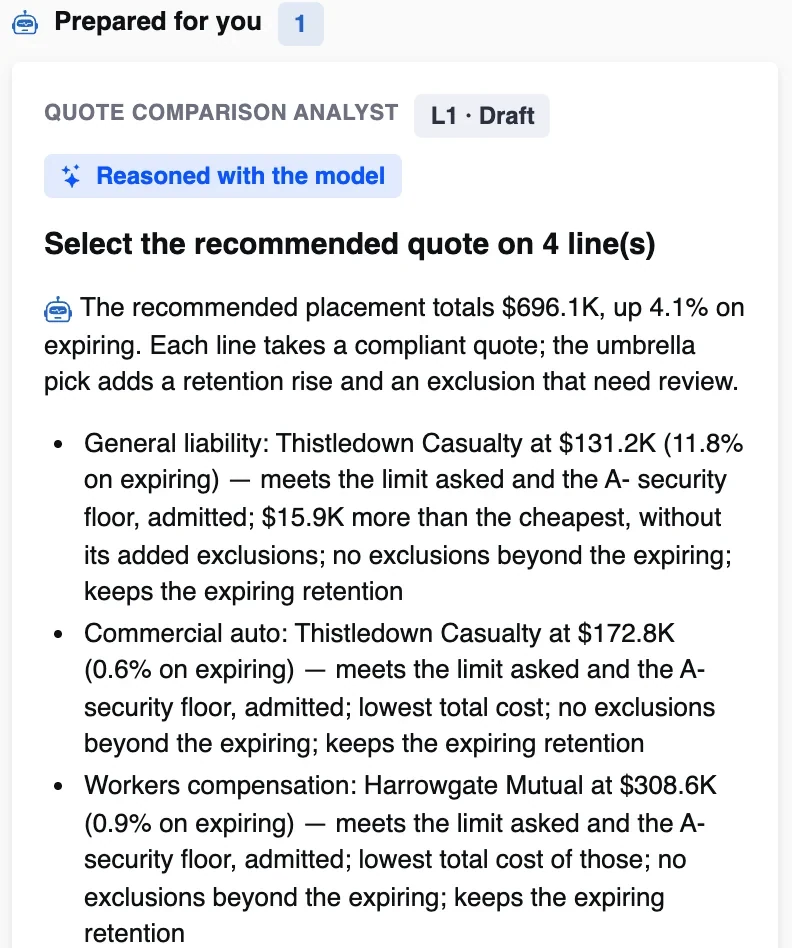
A mechanical and plumbing contractor renews four lines (general liability, auto, workers compensation and umbrella) 44 days out, with $669K of expiring premium. Twelve quotes are in. One comes from a carrier rated below the broker's A- security floor. On general liability the cheapest quote raises the retention from $10K to $20K and adds a silica exclusion.
The comparison engine puts each quote beside the expiring program and flags hard problems (limit short, below A-, surplus lines not cleared) and soft ones (retention up, new exclusions, not appointed). It then picks a recommended quote per line by a stated rule. The quote comparison analyst writes out the reasons line by line: on general liability, the pick is "$15.9K more than the cheapest, without its added exclusions". The recommended program totals $696K, up 4.1%. A placement broker selects each line or picks another with a reason.
Read the full use case: comparing twelve quotes across four lines
InsightProofing: a deductible that doubled and a waiver that vanished
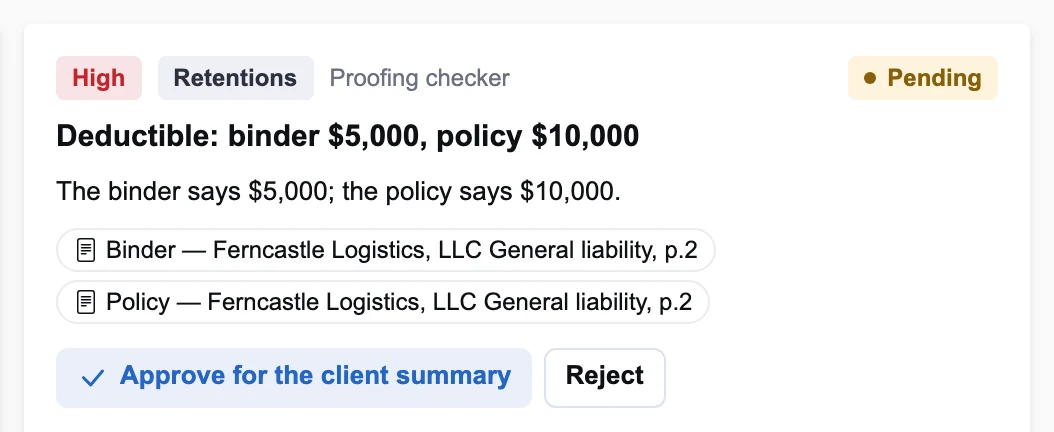
A regional logistics company's general liability renewal arrives a few days after it took effect. InsightProofing reads the expiring policy, the quote, the binder and the issued policy into the same standard fields. It runs 55 checks: 50 match, 3 fail and 2 need a person to look. The deductible was $5,000 on the binder and is $10,000 on the policy. The waiver of subrogation the client's contracts require is on the binder and missing from the policy. A total pollution exclusion that appears on neither the binder nor the quote has been added.
Each failure cites both pages. The discrepancy drafter prepares one correction request covering all three, and nothing reaches the carrier until a person accepts it. A proofing control stops delivery to the client while a high-severity failure is unresolved, so the policy cannot quietly go out as issued.
Read the full use case: a missing waiver and an exclusion nobody agreed
InsightAdvocate: a settlement floor from the wording, not from halfway
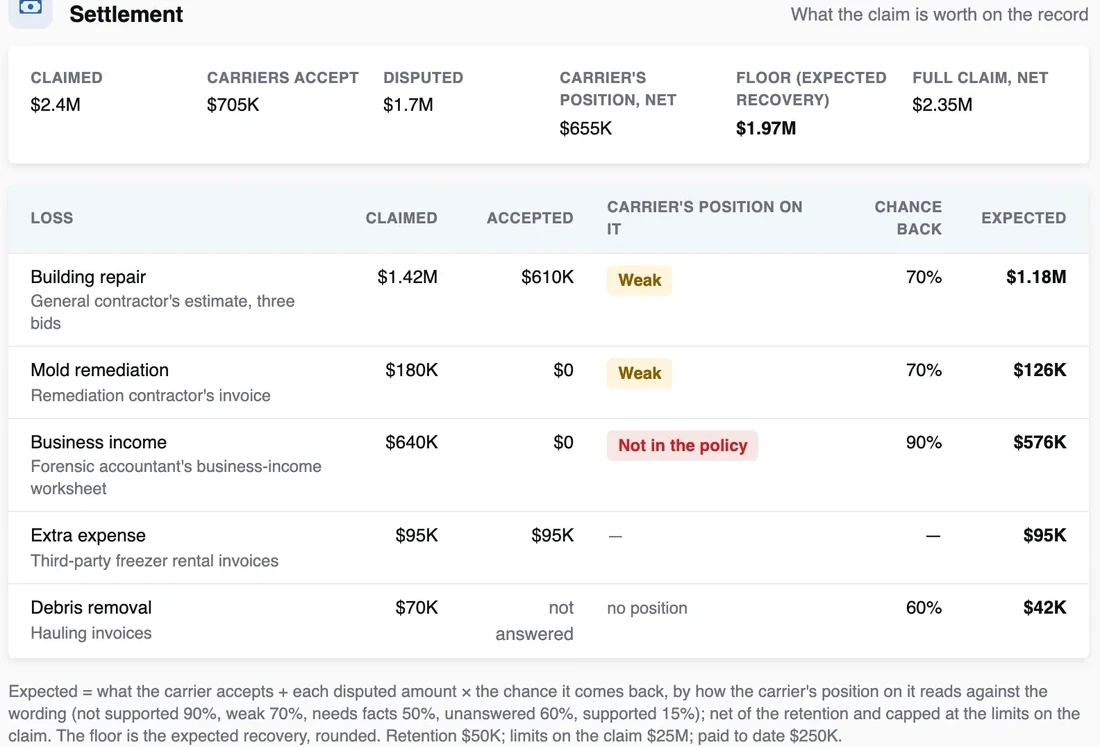
A sprinkler main bursts at a client's facility. The claim is $2.4M and the carrier accepts $705K. The carrier disputes the building repair, denies the mold remediation and business income, and has not answered on debris removal. The coverage engine reads each position against the clause it relies on and rates it as supported, needs facts, weak or not in the policy.
The settlement engine then weights each disputed amount by that reading, using fixed weights printed under the table: 90% when the position is not in the policy, 70% when it is weak, 60% when unanswered. Net of the $50K retention, that gives a floor of $1.97M against the carrier's $655K, and a counter of $2.35M. The carrier is more than 25% below the floor, so a control refers the recommendation to a practice leader before the client sees it. The settlement evaluator drafts the recommendation, and the advocate decides what is sent.
Read the full use case: setting a settlement floor from the wording
InsightDueDiligence: an industrial carve-out on its parent's program
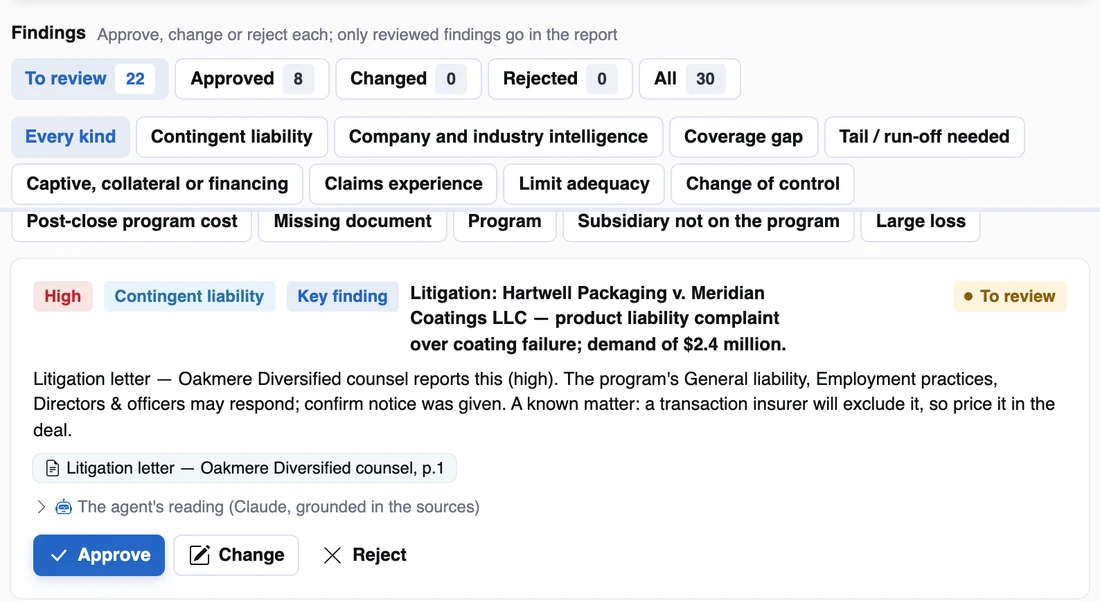
A strategic buyer is acquiring an industrial coatings business from a diversified parent, and the diligence report is due in nine days. The data room has a schedule of insurance, three declarations, five years of loss runs, a Phase I environmental report and a litigation letter. Nine agents work through it. They find nine policies with $1.27M of premium, four of them on the seller's master program and ending at closing. They count 21 claims and $1.26M incurred. They find no pollution policy despite a solvent finding in the Phase I, and a $2.4M product liability demand. They also find a Mexican subsidiary that InsightPulse lists and no policy names.
That comes to 30 findings, 12 of them high. The supervisor agent holds the report while high findings are open and asks a practice leader to sign off. A broker approves, changes or rejects each finding against its page, and only reviewed findings go in the report. Six of them are R&W-relevant and ready to share with the deal's placement in InsightDealDesk.
Read the full use case: an industrial target on its parent's program
InsightDealDesk: a binder that differs from the quote
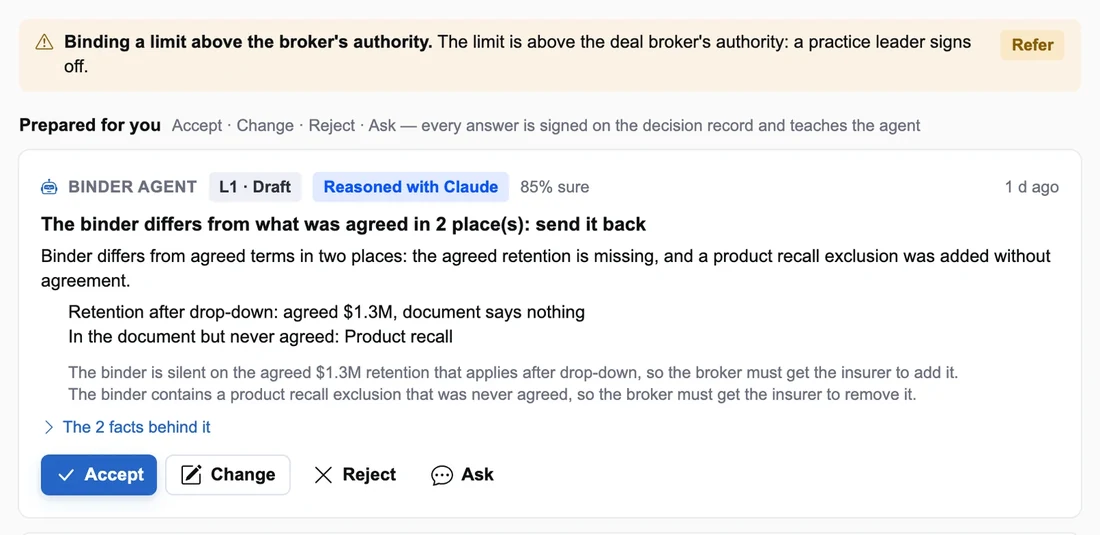
The deal is a $520M industrial buyout with $50M of R&W cover over a $2.6M retention, and the quote was selected two weeks ago. The binder arrives the night before signing. It has the same insurer, the same limit and the same premium. The binder agent compares it field by field with the selected quote and finds two differences. The agreed $1.3M retention that applies after the drop-down is missing. A product recall exclusion that nobody negotiated has been added.
The agent prepares a send-back that cites both differences. Separately, a Rules Studio control refers the bind because $50M is above the deal broker's authority. The broker accepts the send-back. When the corrected binder arrives, Analyze checks it again, every field matches, and a practice leader signs off the bind on the record.
Read the full use case: catching a binder that differs from the quote
InsightRollup: key-person risk before signing
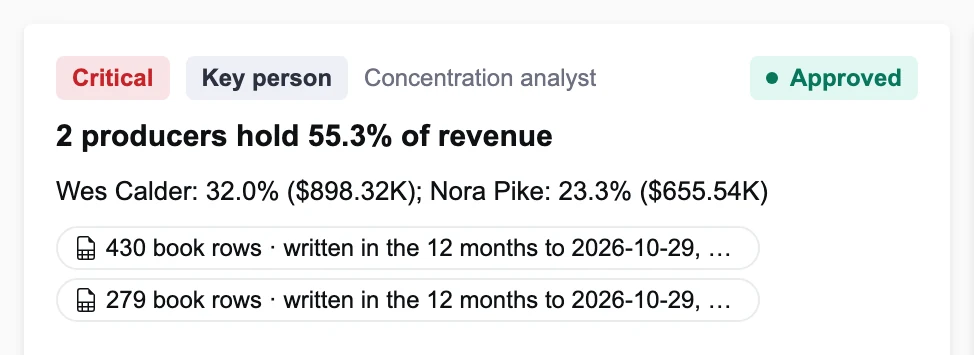
A broker is buying a commercial P&C, construction and agriculture agency with $2.8M of book revenue across 4,070 rows in the seller's export. The book engines compute revenue by producer over the twelve months to the export date. Two producers hold 55.3% of it, 32.0% and 23.3%, and each share is cited to the book rows behind it. A third producer keeps 78.3% of clients against 90.1% for the agency as a whole.
The concentration analyst prepares retention agreements for the two key producers, and the deal lead accepts or rejects them. Because one producer holds more than 25% of revenue, a control refers the deal to the practice leader. The agreements become a condition of signing, tracked on the Producers view and carried into the day-zero integration tasks.
Read the full use case: key-person risk turned into retention agreements
Deployment and governance
- Your cloud, your data, your model account. Each workbench deploys into the broker's own cloud account: an API service, a web app behind the broker's identity provider, and PostgreSQL with a schema per product. Documents go to the broker's object store. The reference build calls Claude on Amazon Bedrock in the broker's account, with a smaller model for agent steps and a larger one for the copilot. Either can be switched off per product.
- Identity, roles and tenancy. Sign-in uses the shared Insight identity layer (local accounts or OIDC), with roles such as account executive, placement broker, deal broker, claims advocate, practice leader and compliance. Every row belongs to an organisation, and a request for an unknown organisation fails closed and sees nothing.
- Model risk. Figures come from engines with known-answer tests. Answers are grounded or discarded, autonomy is capped by configuration, and every agent step is traced with its model, tokens and cost. Each agent has a daily budget. Prompts can be versioned in InsightPrompts and changed without a release, and the test suites never call a model.
- E&O evidence. The decision record holds every prepared decision, the facts behind it, every control that fired and every signed answer. When a client asks why a quote was chosen or a waiver was missed, the answer is one replay away rather than a search through email.
- Contracts between products. Workbenches exchange facts through versioned, signed contracts sent through an outbox, so a hand-off is recorded, retried and received once. They do not share tables.
An adoption path
- Start with one workbench where the pain is. For most commercial practices that is the renewal season (InsightPlacement) or the policy-checking backlog (InsightProofing). For transaction teams it is InsightDealDesk with InsightDueDiligence. For acquisitive brokers it is InsightRollup.
- Run with agents at L1 Draft and every send a dry run. Measure how often the account team agrees with what the agents prepare, per agent and per action.
- Move proven actions to L2 Ask first. People accept prepared decisions instead of starting from a blank page. Rules Studio holds the practice's controls.
- Connect the next workbench once there is a record worth handing on: placement to proofing, proofing to advocacy, diligence to the deal.
FAQ
Do the agents send anything to carriers or clients on their own?
No. Every action that commits the client or the brokerage is capped at L2, ask first. Agents prepare the submission, the correction request, the rebuttal or the appointment request, and a person with the authority accepts it. In demos and tests, sends go to a dry-run provider that records and never delivers.
How do you stop the model inventing a limit, a deductible or a premium?
The model never computes figures. Engines do, from the documents and the book, and each figure carries its source. The model gets those figures as numbered facts and must cite them. An answer with a number that is not in the facts fails the grounding check and is discarded in favour of the engine's finding.
Do we need all six?
No. Each workbench runs on its own against your existing systems, and the platform pieces come with whichever one you deploy. The connections add value as more workbenches arrive.
How does this relate to InsightUW and InsightCW?
They are the carrier-side workbenches, for underwriting and claims, built on the same platform. The broker products do not depend on them: a submission is a document any carrier can read, and the two sides are separate firms that share no data. Both sides do get the same guarantees, with figures cited, agents capped at ask first and a signed decision record.
Which models do you use, and what does a run cost?
The products are model-agnostic behind a shared runtime. The reference build uses Claude through Amazon Bedrock in your own account, with a smaller model for agent steps and a larger one for the copilot. On the demo books a full Analyze costs around one to two cents in model calls. Your documents and volumes will differ.
Is the demo data real?
No. Every screen on the product sites and in this post is the running product on an invented book: invented brokers, clients, targets, agencies, carriers, people and figures. No figure is a customer result.
The products
For the carrier side of the same platform, read The AI-First P&C Insurance Stack.
The bottom line
A broker's AI is worth something when three things hold. Every figure on screen can be traced to a page or a row. Nothing reaches a client, a carrier or a binder until someone with the authority has accepted it. And when an E&O reviewer asks what happened, the answer is a record rather than a reconstruction. Build those into one platform and each new workbench gets them automatically. Each workbench also hands better facts to the next one: diligence to the deal, the bound program to the policy check, the issued wording to the claim, and the claim back to the renewal.